When every attendee group needs different information
For a simple meet-up, a single confirmation email may be enough. At a larger event you have to direct different messages to the right attendee groups and send them at the right moment.
A VIP may need different information than a speaker, an attendee whose payment is still pending, or someone who has just been checked in. On top of that come invitations, reminders, QR-coded tickets, logistics details, changes to the programme and messages sent after the event.
In CONREGO, communication draws on the same data attendees provided during registration. You can pick recipients without exporting lists, filtering data by hand or moving it between different tools.
How does communication work in CONREGO?
Build the message in the editor
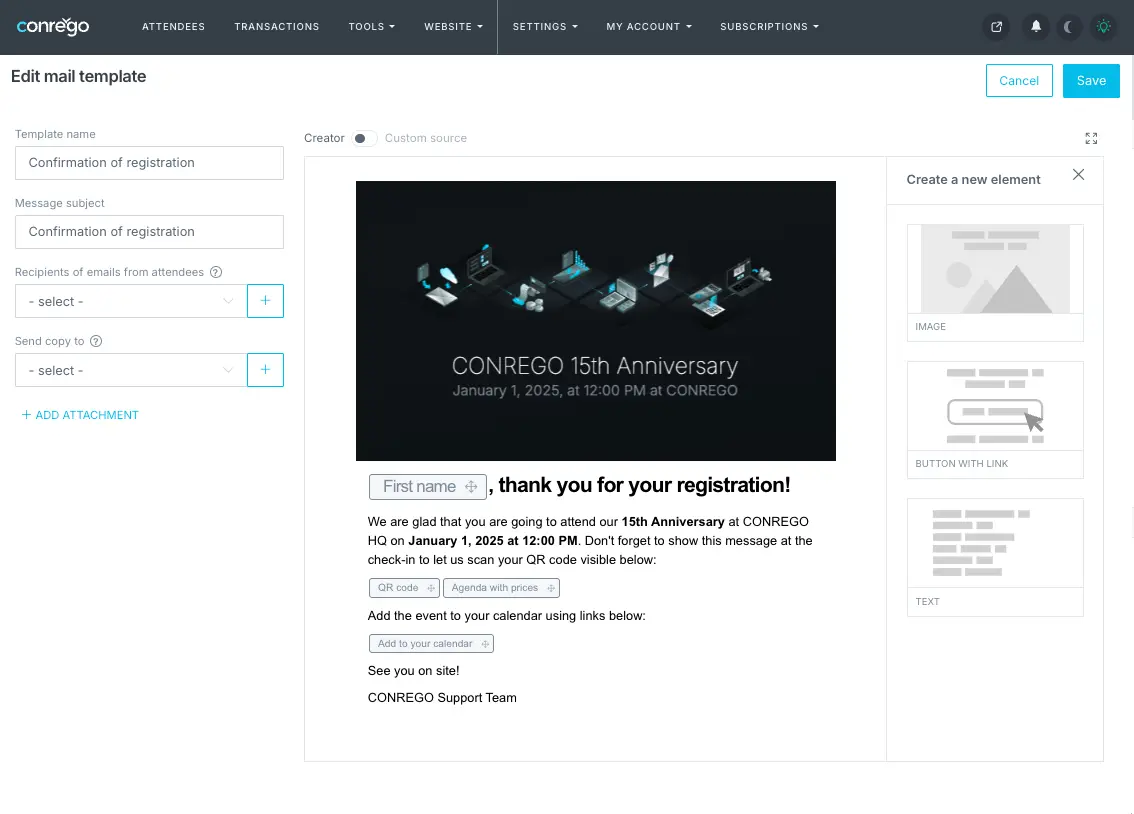
The visual editor lets you create messages containing text, images, buttons and links. You can prepare an invitation, a registration confirmation, a payment reminder, a message carrying a ticket or organizational information.
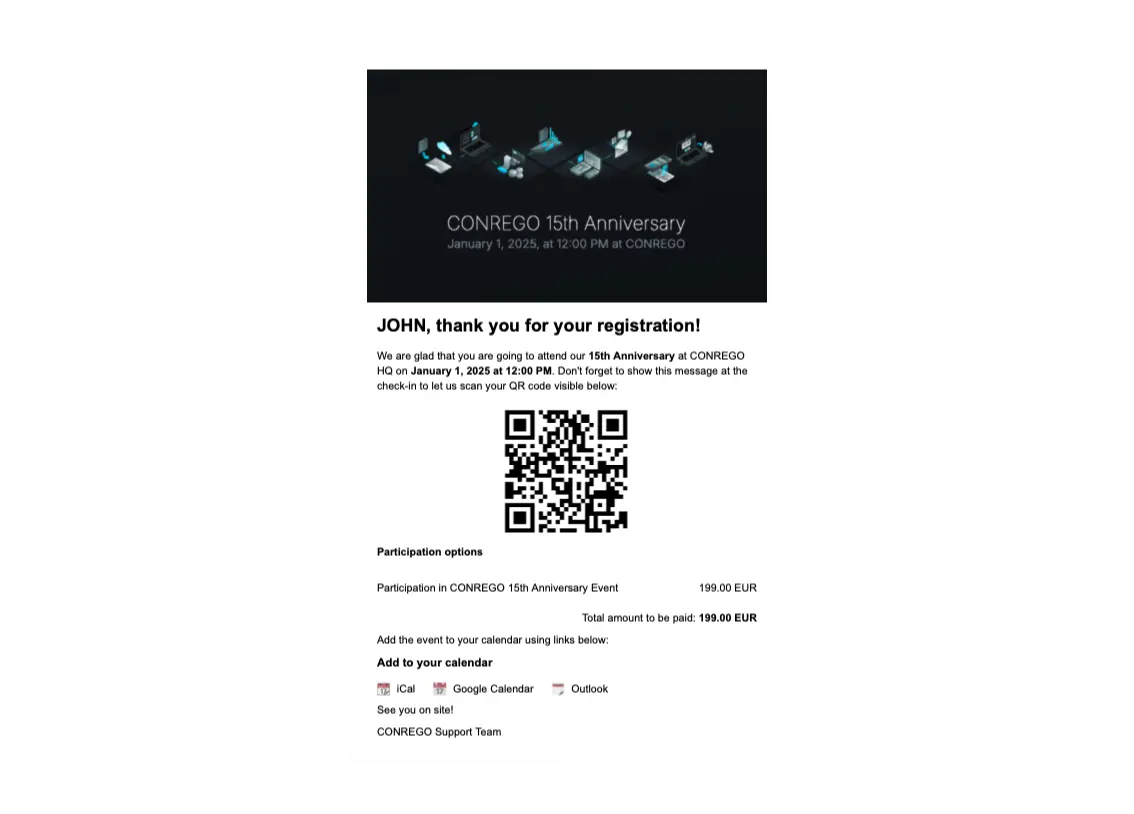
The content can be filled in automatically with a given attendee's data, for example their first name, participation category, personal registration link or details they entered in the form.
Pick recipients based on registration data
You can send a message to every attendee, to a selected group or to a single person. Recipients are chosen on the basis of registration status, payment status and the participation options they picked, among others.
That way a payment reminder reaches only those with an unpaid registration, and workshop details go only to the people signed up for it.
Send once or automate the sending
You can send an invitation, a reminder or an organizational update yourself. You can also configure messages that the system sends automatically after a given event, for example once registration is completed, a payment confirmed, a submission cancelled or an attendee's presence recorded.
Check the status of sent messages
For messages sent through the CONREGO mail server, reports show delivery, recorded opens and clicks on links. This helps you spot problems with important messages sooner.
A report does not guarantee that every message will be delivered or that every open will be recorded, but it tells you far more than sending from a regular inbox.
Invitations, confirmations, reminders and tickets in one place
You can put the Communication module to work at every stage of organizing an event. Send invitations with personal or general registration links, confirmations of submissions, payment reminders and news about changes to the programme, accommodation, parking and entry rules.
Before the event you can send attendees QR-coded tickets, and once it is over - certificates, materials, surveys or an invitation to the next edition.
Personalization that takes work off your team
Personalizing a message does not end with putting a first name in the header. CONREGO can fill the content in automatically with data collected during registration, so each attendee receives information that fits their situation.
You can prepare separate messages for different attendee groups, send personal registration links and attach personalized PDF tickets with a QR code. Recipients get only the information that concerns them, and your team does not have to prepare every message individually.


Email message creator and example email.
Marketing communication that respects attendee preferences
CONREGO lets you collect and record consents for marketing communication and handle their withdrawal. People who have not given consent, or who withdrew it later, can be skipped automatically when marketing messages go out.
This does not apply to messages needed to handle registration and participation in the event, such as a submission confirmation, a payment confirmation or a message with a ticket. You respect attendees' preferences without depriving them of important organizational information.
Email and SMS - two channels, one process
Email works well for invitations, confirmations, tickets, certificates and longer organizational information. SMS is worth using when a message should reach the attendee quickly - as a reminder about the event, a note about a room change or a link to an important announcement.
CONREGO is not a provider of SMS services, but it can be connected to an account with an external operator such as SMSAPI. Emails and text messages then go out on the basis of the same attendee data, without building separate recipient lists.
Want to simplify communication with your attendees?
In CONREGO you prepare and send invitations, confirmations, reminders, tickets and text messages using the data gathered during registration.
Frequently asked questions
Yes. You can build emails in the visual editor using text blocks, images, buttons and links. If you need a non-standard layout, you can also create a message from your own HTML code.
Yes. You can attach files to a message, though we recommend using PDF. Other formats, such as DOC or ZIP, may be blocked by the security systems on recipients' mail servers.
Yes. CONREGO can be connected to an account with an external SMS operator, such as SMSAPI. Charges for the messages sent are settled under the agreement you have with the operator you choose.
The report shows the status of a sent message along with recorded opens and clicks on links. It is available for messages sent through the CONREGO mail server. If you use your own sending account, information about those sends will not appear in this report.
Data on opens may be incomplete, because it depends on things like privacy settings and the way the recipient's email client works.
Yes. You can select recipients based on registration or payment status, so the reminder is sent only to people with an unpaid submission.
Deliverability depends on things like the reputation of the sender address and domain, the configuration of the mailbox, the content of the message, the number of images and links, and the security measures used by recipients' servers.
CONREGO provides reports that help you check the status of a send, but no platform can guarantee that every single message will be delivered.
Some versions of Outlook display HTML messages differently from other email clients. That can cause differences in the placement of elements, in spacing or in text formatting.
Before sending, it is worth testing the message in several popular email clients and avoiding overly complicated layouts.
Yes. You can configure messages that are sent automatically after a given event, for example once registration is completed, a payment confirmed or an attendee's presence recorded. You do not have to send every confirmation or reminder by hand.
Yes. CONREGO lets you configure your own sending account through an external SMTP server. Attendees will then see the sender name and email address you specify.
Bear in mind that the deliverability reports available in CONREGO cover messages sent through the CONREGO mail server. If you use your own account, data about those sends has to be checked with its provider.
Yes. You can prepare separate language versions of your templates and then send them to the right attendee groups. Recipients can be selected based on the language assigned to their registration.
Yes. Marketing messages can include a link that lets the recipient unsubscribe. The withdrawal of consent is recorded in the system, and the Communication module automatically skips those people on subsequent marketing sends.
Unsubscribing from marketing does not block messages needed to handle participation in the event, such as a registration confirmation, a payment confirmation or a message with a ticket.
Yes. You can send an invitation containing a personal link that leads to a form partly filled in with attendee data imported earlier. This makes registering easier and lets you open selected participation variants only to invited people.
Yes. In CONREGO you can prepare a personalized PDF document containing the attendee's details and a QR code, and then attach it to an email. This is how you send tickets, badges and certificates, among other things.